Configuring for Fortnite Festival
For fortnite festival, there are different options depending on what you are playing on.
Windows
Its easiest to emulate a riffmaster, as this then gives you all the guitar inputs in game and just works. You will need to add a mode binding to swap to xbox one mode to use this.
How to add the mode binding
- Hit
Add Setting - Pick
Console Mode Binding - Make sure the Emulation Mode is
Xbox One / Series S / Series X - Pick the correct
Input Typeand then configure the rest of the settings as necessary. You are configuring a button that when held will jump to keyboard emulation mode.-
For example, on wii you may do something like this:
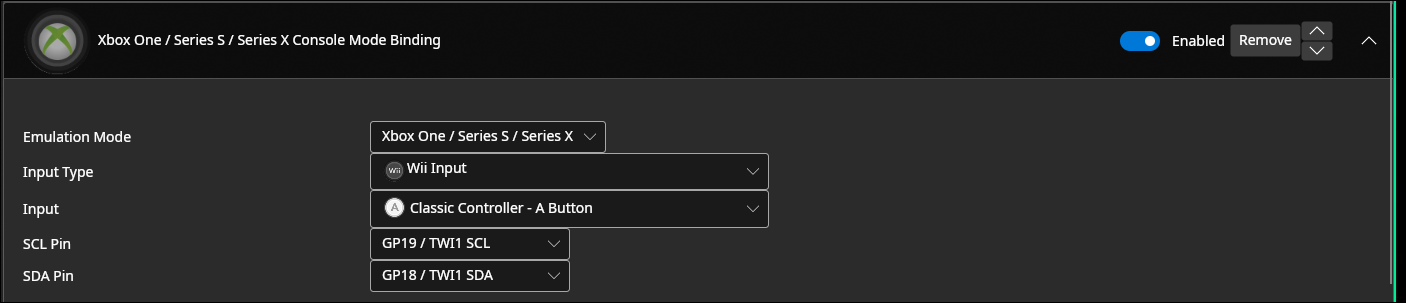
This would make it so holding green when pluging in the guitar makes the guitar go into xbox one controller mode.
-
For direct you may do something like this:
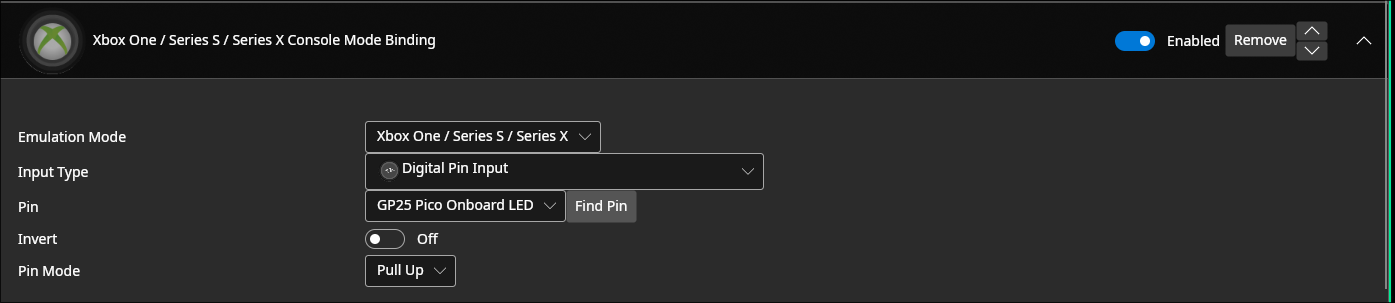
This would make it so holding the button on pin GP4 when pluging in the guitar makes the guitar go into xbox one controller mode.
-
- Save your settings
- Unplug and replug the guitar, holding the input you just configured. Your guitar should show up as a riffmaster in game now.
- Play festival
- Unplug and replug the guitar without holding a button to go back to normal mode or to configure.
Console - Keyboard mode (Works on console without authentication)
For festival, its easiest to use keyboard mode on consoles. This is because keyboards don't require auth, so you don't have to deal with plugging in a device for authentication. You will need to add a mode binding to swap to keyboard mode to use this.
How to add the mode binding
- Hit
Add Setting - Pick
Fortnite Festival (Pro Mode - Keyboard)-
This will work on consoles and PC
-
For example, on wii you may do something like this:
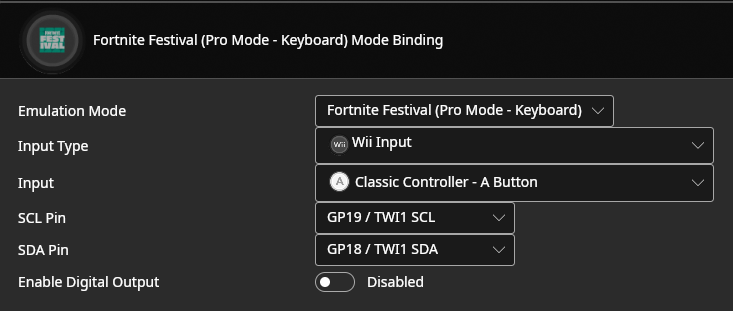
This would make it so holding green when pluging in the guitar makes the guitar go into the Fortnite Festival keyboard emulation.
-
For direct you may do something like this:
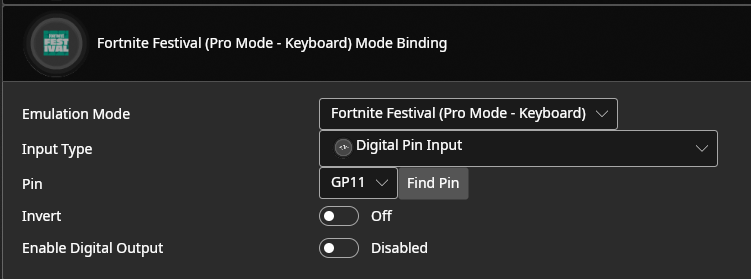
This would make it so holding the button on pin GP4 when pluging in the guitar makes the guitar go into the Fortnite Festival keyboard emulation.
-
- If you wish to play on PlayStation, go into
Controller Settingsand make sure theRollover Modeis set to6KRO - Save your settings
- Unplug and replug the guitar, holding the input you just configured. Your guitar should show up as a keyboard now.
- Play festival
- Unplug and replug the guitar without holding a button to go back to normal mode or to configure.
Console - Native controller (Requires keeping an authentication controller plugged in)
If you wish for your guitar to show up as a native guitar on PS4/5 or Xbox One / Series, you will need to follow the authentication instructions, and then your guitar will just work. Note that this does mean you need to plug a controller in to authenticate, and for PS4/5 the controller will need to stay plugged in, so it isn't as simple as keyboard mode. note that for PS4, you will need to set the ps4 emulation mode to PS4 under USB host, as it defaults to PS3.
iOS
For festival there is a specific mode for iOS compatibility. You will need to add a mode binding to swap to iOS to use this.
How to add the mode binding for iOS
- Hit
Add Setting - Pick
Fortnite Festival (Pro Mode - iOS) - Pick the correct
Input Typeand then configure the rest of the settings as necessary. You are configuring a button that when held will jump to keyboard emulation mode.-
For example, on wii you may do something like this:
This would make it so holding green when pluging in the guitar makes the guitar go into the Fortnite Festival keyboard emulation.
-
For direct you may do something like this:
This would make it so holding the button on pin GP4 when pluging in the guitar makes the guitar go into the Fortnite Festival keyboard emulation.
-
- If you wish to play on PlayStation, go into
Controller Settingsand make sure theRollover Modeis set to6KRO - Save your settings
- Hold the button you configured while plugging your controller into your iOS device
- Play festival
iOS + Switch + Android setup
On devices without native guitar support, the games default to mappings that are not suitable for navigation and gameplay. For this reason, we support toggling between two sets of mappings, one set that allows for navigating menus, and one for gameplay
- Hit
Add Setting - Pick
Fortnite Festival (Menu / Gameplay toggle) - Pick the correct
Input Typeand then configure the rest of the settings as necessary. You are configuring a button that when pressed will toggle between the two sets of mappings. For this reason, you need to map this either to a button that doesn't have another function, or you can map this to a shortcut so that you need to press a button combination to toggle.-
For example, on wii you may do something like this:
This would make it so holding green when pluging in the guitar makes the guitar go into the Fortnite Festival keyboard emulation.
-
For direct you may do something like this:
This would make it so holding the button on pin GP4 when pluging in the guitar makes the guitar go into the Fortnite Festival keyboard emulation.
-
- Save your settings
- Start festival and get into a song
- Hit your button combination
- Play